
Electronic
Parachute
Deployment
System
 Sponsored by: Texas Instruments


ECE 480 – Senior Capstone Project
– Design Team 7
Fall 2013
Michigan State University
Faculty Adviser:
Dr. Jes Asmussen
Texas
Instruments Contact:
Pete Semig
Design Team
Members:
Tayloire Thomas
Ryan Lupinski
Ian McCall
Moses Jones
Kyle Christian
Executive Summary
The object of the semester design
challenge was to design, simulate, fabricate, test, and demonstrated a Texas
Instruments (TI) based electronic parachute deployment system for large model
rockets. The motivation for this challenge was given to the design team by TI
contact, Pete Semig, to design a more dependable parachute deployment system
due to an interest in model rocketry by Pete’s boss. Most model rockets deploy
a single parachute based on a timed release charge in the motor of the rocket.
Problems can occur in this traditional set up if weather conditions are rough,
or if the rocket is rated to launch high enough, wind may cause a long distance
drift from the launch site. This led to the design criteria of using two
sensors and a TI microcontroller to deploy two parachutes for a safer decent
and retrieval of the large model rocket. Electronic deployment systems are not
new to the world of high level model rocketry, but are very expensive and often
out of the knowledge scope of most mid to entry level hobbyists. This design
aims to make an inexpensive printed circuit board (PCB) booster pack for the
MSP430 microcontroller that utilizes an accelerometer and altimeter to deploy
two parachutes in large scale model rockets. The design team created a working
booster pack for the MSP430 which is powered by a 9V battery and reads analog voltages
from the sensors, and wrote code which allows the MSP430 to interpret these
voltages as current states of the rocket to safely deploy parachutes. While
achieving the deliverables we set out to achieve, during the last aspect of our
project – the rocket launch, we experienced mechanical failure when our rocket
caught on fire prior to takeoff. Despite this, our project was a major success,
and given more time to launch again, and more resources for a replacement
rocket tube, we would be able to fully enjoy the fruit of our efforts by
watching a watching launch.
Acknowledgements
Team 7 would like to thank our
project sponsors from Texas Instruments, Mr. Peter Semig and Mr. Mike Mock for
supporting the group with their technical expertise, and project management
wisdom. We have learned a great deal, and appreciate the opportunity to be held
to high standards – this will have a lasting impact upon our professional
development in the future. Thank you for sponsoring a project that was not only
technically fulfilling, but also very fun and interesting.
We are particularly grateful to
our faculty facilitator, Dr. Jes Asmussen, for his patient guidance, valuable
critiques, and most importantly his enthusiasm and optimism. The latter of
which inspired us to learn from the many setbacks to be encountered throughout
any design process.
The utmost gratitude extended
towards the Jackson Model Rocketry Club (JMRC). Prior to this project, the team
was very limited in its knowledge and experience with model rocketry. The JMRC
welcomed us with open arms to several rocket launches and taught us vital
information about model rocketry. Two members in particular… Mr. Randy Gilbert
and Mr. Rob Dickinson, became our project’s biggest allies- contributing
knowledge, and lending expensive launch equipment, without which would have
meant the end for our project.
Special thanks to the ECE
Department’s technicians- Mr. Brian Wright and Mr. Gregg Mulder for all of the
technical assistance in selecting proper components for our designs, as well as
the quick turnaround on the barebones PCB used within our project.
Finally, Ms. Roxanne Peacock was
instrumental in our project. We would like to thank her for all of her
assistance in procuring our orders, and at several times helping to expedite
the shipping process.
Table of
Contents
Chapter 1: Introduction
and Background
Chapter 2: Exploring the
Solution Space and Selecting a Specific Approach
Chapter 3: Hardware
Implementation
Chapter 4: Simulation and
Testing
Appendix I : Technical
Contributions
Appendix III: Technical
Attachments
Chapter 1: Introduction
and Background
Project Background
The goal of the design project
was to design a low cost and efficient electronic deployment system using a
MSP430 LaunchPad microcontroller interfacing with a printed circuit board (PCB)
boosterpack which consists of an accelerometer, altimeter, LCD, and other
meaningful electrical components. The circuit design must
account for the deployment of two parachutes in the retrieval process that will
be governed by the sensors and MSP430 microcontroller to successfully bring a
model rocket back from flight.
Model rocketry is a
well-established hobby for all walks of life. It can range from an exciting
educational activity for youth to a highly technical and competitive recreation
for adult enthusiasts. Over the past 50 years, model rocketry has been a
popular hobby with such organizations as The National Association of Rocketry,
which helps promote the continued education and practice of hobby rocketry. All
model rockets follow the basic principle of staging a flight, lifting off by
propellant, and a retrieval system.
Electronic parachute deployment systems are
not ground breaking technology, and yet are relatively uncommon in amateur
rocketry. Most highly technical retrieval systems are seen by high-power rocket
enthusiasts in expensive and weighty designs. The team’s project sponsor, Peter
Semig, is an applications engineer at Texas Instruments. Pete’s direct
supervisor is a hobby enthusiast with large scale model rockets. The prompt for our project arose from a malfunctioning
parachute deployment system. In need of a definite solution, we were dispatched
to create a lightweight and relatively low-cost electronic-based retrieval
system that can be used by rocket enthusiasts of any level, and create a
detailed and repeatable process for production.
Project Specifications
The chosen specifications
presented to the team were to develop a BoosterPack that is compatible with the
TI’s MSP430 microcontroller. The BoosterPack must utilize an accelerometer and
altimeter. These sensors must detect
acceleration and altitude from the rocket launch and output accurate data to
the MSP430. Also, coding must be integrated with the MSP430 to properly deploy
two parachutes.
The heart of
the design project is the MSP430 microcontroller (Figure 1). It will be
directing the functions of our designed PCB board. The PCB board base will be
designed using a Booster Pack. These electrical components in turn will be
controlling the actions of the rockets parachutes.
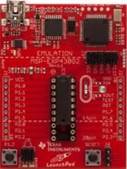
Figure 1 MSP430 LaunchPad
Specifically, for large scale
model rockets, there are many designs that engineers have come up with in
modern years. After researching many designs, the team decided on implementing
a dual parachute design inside of the circuit design. Large model rocket bodies
are composed of six separate parts. Starting from the top of the rocket and
moving down in sections, first there is the “Cone” or top of the rocket. The
only function of the cone is for aerodynamic purposes of flight path. Second
(optional) is the “Payload” bay which is an empty bay where you can place any
random items of choice. Third is the “Drogue Parachute” bay. This bay holds the
drogue parachute and its charge. The drogue parachute is considered the primary
parachute which will be the first to deploy. Fourth there is the “E-bay” or
electronics bay. This is where our PCB board will be placed. Next is the “Main
Parachute” body. Similar to the drogue bay the main parachute bay holds the
main parachute and its charge. Lastly, there is the base of the rocket. The
base holds the rocket motor, and has the directional “Fins” attached. This is
all shown in Figure 2.

Figure 2 Rocket Cross-Section
In
order to simplify the complexity that the circuit design will play in the
parachute deployment system; the team designed a block diagram of the system-
level circuit design that is shown below in Figure 3.

Figure 3 Block Diagram
As displayed
in Figure 3, the PCB (Booster Pack) will be connected to a power supply and the
altimeter and accelerometer will be integrated into the board. Those sensors
will measure the altitude and acceleration of the rocket in flight. This
information will then be relayed to the MSP430 and recorded. The altimeter and
accelerometer will both serve secondary proposes aside from recoding flight
data. The accelerometer will measure acceleration associated with weight
experienced by any test mass at rest. For an example if the accelerometer is at
rest on the surface of the earth it will read g= 9.81 (m/ s²), OR g=1. While in
free fall however it reads g= 0 (m/s²). Also, when the rocket reaches apogee
(highest point) and then starts to go into free fall (g= 0 (m/s²)) the
accelerometer will send a current signal to at voltage relay. This relay’s
coils will then become charged and close a switch. The single switch will
connect a secondary battery which will dump current to an igniter which will
light the primary charge. This primary charge will deploy the Drogue parachute
as shown in Figure 4 below.
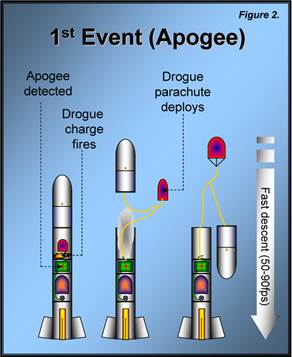
Figure 4 Deploying the Drogue
Parachute
This drogue parachute is meant to
let the rocket fall fast initially so it does not travel far from the launch
site. Once the rocket falls to a set altitude programmed into the
microcontroller, say 300-500ft, the altimeter will recognize the altitude in
the form of a voltage signal. When the altimeter measures the set altitude
programmed into the MSP430, it will then send a current signal of its own to a
second voltage relay. This second relay switch will be connected to the same battery
as the first relay; however it will be connected to a secondary igniter. The igniter will cause the secondary charge
to ignite and deploy the main parachute. This can be seen in Figure 5 below.
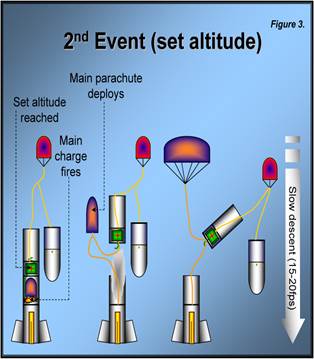
Figure 5 Deploying the Main
Parachute
The main
parachutes purpose is to slow the decent of the rocket to a safe speed, so it
does not take damage upon landing.
Project Development
The team had a total of six
learning objectives to accomplish in order to successful during the design
process. Learning objectives:
1.
Build
relationship with Texas Instruments and clearly define concept of project
2.
Produce
conceptual solution and initial design for PCB circuit
3.
Establish
budget criteria, order parts, and create proto-type
4.
Test
proto-type and implement changes
5.
Optimize
weight of component and integrate to MSP430 micro controller
6.
Full
integration into model rocket and final testing
Throughout the design process,
the team completed three phases to design the electronic deployment system.
Phase I was the development of the Booster Pack for the MSP430 Launch Pad.
During this phase, the team decided on the different electrical components that
were going to be implemented into the circuit design. The team used TINA-TI, a circuit simulation
program, to create schematics and run simulations before the designing of the
PCB. Also, the team used PCB-Artist software for the designing of the final PCB
used in the design process. Phase II was the integration of the Booster Pack
(PCB) and MSP430. This phase also
included design and fabrication of the final PCB. The team used TI’s Code
Composer Studio, which consisted of C programming, to check and compare digital
voltage values to designated limits to ensure the parachutes are deployed at
proper times. Phase III was dedicated to testing our circuit design,
eliminating all existing errors so the team could launch a functioning
EPDS-equipped model rocket and recover it for future use. During each phase the
team worked as a group problem solving different issues, and making necessary
modifications to steer the design process in a positive direction to achieve
our overall project goals.
Chapter 2: Exploring
the Solution Space and Selecting a Specific Approach
Design
Specifications
Before our
team could move forward in a final design approach, the design specifications
had to be laid out and evaluated. Once our project description was presented to
us by Texas Instruments (TI), and we had spoken with our sponsor from TI (Pete
Semig) we were aware that we would have to incorporate electronics and model
rocketry into one. Our team decided that we would not only have to work
alongside both our sponsor but also model rocket experts as well to achieve our
goal. Our sponsor could provide us with the resources; however they had no real
knowledge about rockets. The approach we decided to take was to work on our
circuitry design in parallel with our rocket design in order to quickly work
out design issues for both instead of having conflicting issues farther down
the road in our design process. The purpose of this project was to design,
simulate, fabricate, test, and demonstrate an electronic parachute deployment
system using TI-based components. In order to achieve this goal we would have
to design circuitry to integrate the TI-based components with a provided
microcontroller (MSP430) such as printed circuit boards (PCB’s), an altimeter,
accelerometer, and LCD which could then be integrated into large scale model
rockets. Along with this however we need to have a properly designed rocket
which will fly properly so that it complements our circuitry design or else our
project will be for not. For a design to be deemed feasible it had to
incorporate these components as well as be lightweight, low power, very
accurate and robust to insure safety and reliability.
Accelerometer
The first
requirement of our design was that our circuitry needed to incorporate an
accelerometer to detect acceleration/velocity of the rocket during flight. The
signals received from the accelerometer were intended to be used for some sort
of deployment/data collection.
Altimeter
The second
requirement of our design was that our circuitry also needed to incorporate an
altimeter to detect altitude of the rocket during the flight. Just like the
accelerometer, we were expected to use the outputted signals from the altimeter
to be used for deployment/data collection.
LCD Display
In addition
to the altimeter and accelerometer, TI proposed that we also incorporate
smaller type of LCD display into our circuitry design that would be used to
report real time data. The main intention for the LCD display was to be used to
demonstrate a simulation of our circuitry on the ground considering that during
actual integration it would be inside the rocket in-flight.
Lightweight
One of the
most important factors in rocket flight is total weight. Model rockets need to
be made of very light material in order to achieve proper flight. Our team is
working with large scale model rockets which have even more strict weight
regulations due to the large amount of thrust needed to move them compared to
the smaller and average size model rockets. With this being said we needed to
make our entire circuitry design, power supply included, as light weight as possible
so it could be used in a wide range of rocket sizes.
Robustness
Over a full
rocket flight, from take-off to apogee to landing, our circuitry will endure a
lot of abuse. This abuse comes in the forms of pressure changes, temperature
changes, and impact forces upon landing. With this in mind we needed to ensure
that our circuitry would be made of robust electrical components to resist
possible weathering as well as properly sealed and padded within the rocket to
also ensure shock and impact resistance.
Microcontroller
(MSP430)
Finally the
last requirement in TI’s project description was to use a TI-based
microcontroller to program, control, and read our component signals. This would
be the most important part of our project design in that it has to be very
accurate and dependable considering it would be the device that would ignite
the charges to deploy the rockets parachutes.
For safety we also had to include fail safe timers, in case our
circuitry sensors malfunctioned during the flight.
FAST Diagram
The Function
Analysis System Technique (FAST) Diagram is a method introduced to the team
during the design process. The FAST Diagram is used to determine the essential
functions that the design should accomplish. The FAST Diagram below displays
from left to right the task, basic function and secondary functions that our
teams design should accomplish. For example, reading from left to right, to
“Ensure Recovery/Reuse” we had to protect our interior components such as our
circuitry and parachutes using high temperature resistant insulation as well as
use bright colored paint for the body of the rocket to keep track of it during
flight. The FAST Diagram was very helpful to our team, making the process of
creating conceptual designs for our project, as well as brainstorming possible
functionalities for our design relatively simple.

Figure 6
FAST Diagram
Conceptual Designs
The main
objective of our design project is to create an Electronic Parachute Deployment
System (EPDS) for large scale model rockets. The requirements and goals had
been listed however there were many different routes to achieve the overall
objective including rocket design and circuit design that our team had to
decide on.
Pre-made
Model Rocket
The first
design under consideration was to use a pre-made model rocket that we could
purchase and design EPDS around. This would be a fully complete model rocket
that we would have to design an electronics bay to support our PCB,
microcontroller, and power supply along with a deployment method.
Design &
Build Entire Model Rocket
The second
design under consideration was to build a model rocket from the ground up,
designed around our EPDS. This would include purchasing model parts to
accommodate our EPDS design, and base the size and scope of the rocket
depending on how our circuitry would work.
Single vs.
Dual Deployment Parachutes
Another
design concept that we had to decide on was if we were going to use a signal or
dual parachute deployment parachute system for our rocket. In addition to this
we had to decide if we would use just a single sensor (Altimeter) for
deployment responsibility and one specifically for data collection
(Accelerometer), or use each sensor for an individual parachute deployment
(Dual deployment).
House of Quality Matrix
A “House of quality matrix” is a Six Sigma based tool that was
also introduced to the team during the design process that is used to define
the correlation between customer (TI) demands and product capabilities. To
further help our team breakdown and analyze TI’s demands relating to the
project solution, we created and then filled out the chart, seen in Figure 7,
using the information we had as well as personal opinions on the teams design.
In this diagram, the items listed in the rows are the customer’s requirements
while the listed in the columns are the design function requirements. The team
then defined the correlation between them using three levels (weak, moderate
and strong). The importance and weight of each customer requirement was then
addressed accordingly and prioritized. Also the triangular “roof” matrix on top
of the house is used to identify where the technical requirements, support or
impede one another.
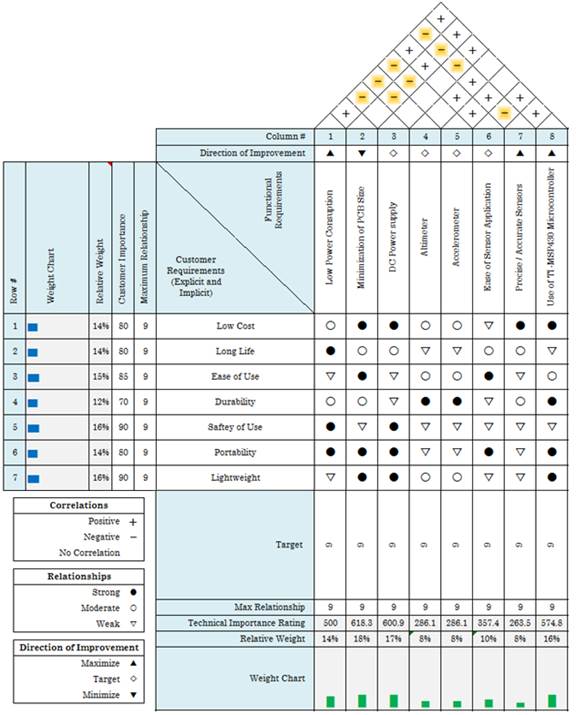
Figure 7:
House of Quality matrix used to analyze customer requirements
Chosen
Design
The next
step our team had to take in the design process after coming up with multiple
conceptual designs was to choose the most feasible one. To help us accomplish
this we used another tool that was introduced to us during the design process
called a “Feasibility Matrix”. The
feasibility matrix takes multiple team designs and compares them to different
parameters such as cost, time and functionality. Seen below in Figure 8 each
design is rated from 1-10 for each parameter, 10 being the highest. The numbers
are then totaled for a score out 30.
|
|
Pre-made
Model Rocket |
Design
& Build Entire Model Rocket |
Single
Deployment Parachute |
Dual Deployment Parachutes |
|
Cost |
A fully
built ready to fly in box rocket kit, along with accessories, and supplies to
make an electronics bay. $250 Feasible
(8/10) |
With the
necessary tools and parts bought in an unassembled kit, there is more work to
be done however it greatly lowers the. cost. $133 Feasible
(9/10) |
Having to
use the same circuitry components for either one, their cost does not change.
However using a single chute cuts down on rope costs & fabric $20 Feasible
(9/10) |
Having to
use the same circuitry components for either one, their cost does not change.
However using a dual chute doubles the price. $40 Feasible
(7/10) |
|
Time |
With
rocket fully complete rocket, this would open a lot more time for circuitry
design. Feasible
(10/10) |
Having to
fully construct the rocket this would cut down a lot of flex time for circuit
design. Feasible
(6/10) |
Having
this design would allow for less time in rocket design but no less time in
circuit configuration. Feasible
(8/10) |
Having
this design would take a little more time in rocket design but no less in
circuit configuration. Feasible
(7/10) |
|
Functionality |
Having a
pre-made rocket creates restrictions on our circuit design with PCB size etc.
Have to build circuit to fit one type of rocket. Feasible
(3/10) |
Building
from scratch, we can have a more flexible design. Accommodating &
building around our circuitry instead of the other way around. Feasible
(10/10) |
Single
parachute is not practical for large scale model rocket. With one parachute
being deployed at high altitude. The ticket would be lost. Feasible
(5/10) |
Dual
parachutes are much more practical for our rocket. Also we can utilize both
of our sensors for deployment purposes which are more robust for our project. Feasible
(10/10) |
Figure 8:
Feasibility Matrix of conceptual designs
From the
feasibility matrix shown above, you can see that designing a large scale model
rocket from scratch is the most cost effective design as well as being the most
flexible design to accommodate our EPDS circuitry. Even though the time
parameter isn’t the most feasible, the cost is worth the benefit in this
situation when it comes to overall value and functionality. With this design
chosen, we then decided that we would use a dual parachute deployment system
which is much more feasible that a single deployment system for our overall
project as shown in the matric above. Using a dual deployment system would
complement our circuit design much more than a single deployment system by
incorporating both our required altimeter and accelerometer into the electronic
deployment process. The decision was made the research more into electronic
dual deployment because it complimented our project needs so well. After doing
some in depth research we had found that some similar commercial products were
already on the market that specifically used altimeters for parachute
deployment, which made our team very confident in moving forward that we could
accomplish our overall goal.
Initial
Estimate of Cost’s
|
Product |
Provider |
Cost |
|
MSP 430
Launch Pad |
Texas
Instruments |
$0 |
|
Digital
Altimeters |
Digi-Key |
$8.28 |
|
Analog
Altimeters |
Digi-Key |
$15.66 |
|
Analog
Accelerometers |
Digi-Key |
$29.78 |
|
PCB
Fabrication |
Texas
Instruments |
$33.00 |
|
Torrent
rocket kit |
Madcow
Rocketry |
$133.45 |
|
E-Launch
Controller |
Estes |
$22.28 |
|
Total
Budgeted Amount (MSU budget given: $500) |
$242.25 |
|
Chapter 3:
Hardware Implementation
Sensor Selection:
After analysis of the problem
statement and initial design solution, the process of selecting sensors began.
The criteria of selecting sensors was that they would be surface mountable, run
on the same power as the microcontroller (1.8V – 3.6Vmax), less than five
dollars, and be either analog or digital output. As the selection narrowed down
it was decided that it would be easier to select all analog sensors and utilize
the analog to digital converter of the MSP430. After all of the criteria was
decided on, the design team selected the ADXL330 accelerometer from Analog
Devices, and the MPXM2102 barometric altimeter from Freescale Semiconductor
shown below.
|
Analog Devices |
Freescale Semiconductor |


Figure 9: Left: ADXL330 Right:
MPXM2102
The ADXL330 is a small, surface
mount, 3-axis output, low power accelerometer that costs $3. This sensor was
selected because it met all the design criteria, and gave the flexibility to
use any axis so mounting the device would be less restrictive. This would prove
to be extremely helpful during the integration process of the booster pack into
the rocket. The MPXM2102 from Freescale is $3.51 surface mount, differential
gauge pressure device that runs from 1.8V – 10V. These devices fit the criteria
of the design solution and the process to design the PCB began.
Circuit Design:
The design team used the free
software PCB Artist from 4pcb.com to lay out the schematic. The first step was
to design component schematics for the sensors. This would allow the software
to symbolically represent each component in the schematic. The symbols created
for the sensors are shown below.

Figure 10 ADXL330 symbol

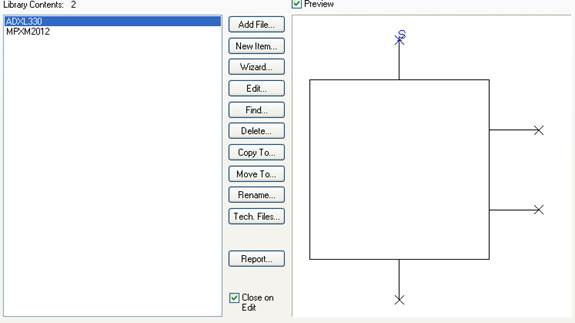
Figure 11 MPXM2102 symbol
The next step was to create
‘footprints’ for the sensors that would all them to be mounted properly and
soldered onto the PCB once it was fabricated. This involved using the component
wizard in PCB Artist and matching the specs on the sensors datasheets to the
component layout in software. The PCB symbols are shown below.
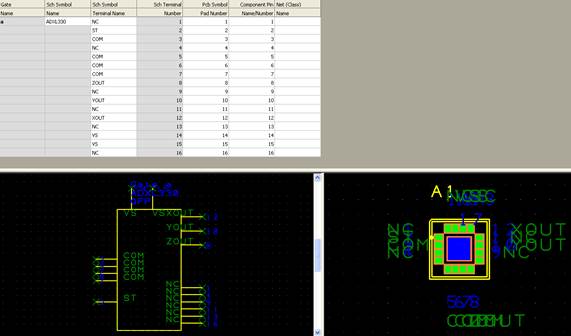
Figure 12 ADXL330 PCB symbol
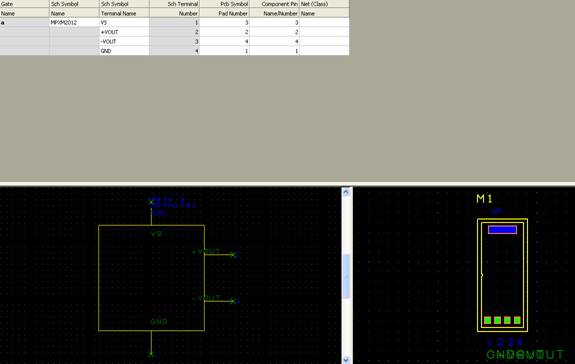
Figure 13 MPXM2102 PCB symbol
After finalizing the schematic
symbols and PCB symbols, the full schematic and PCB design could begin. The
symbols for the sensors and minor components were laid out in PCB artist and a
template for the pin out of the MSP430 was created by Mike Mock at TI. The
schematic for the circuit made in PCB Artist is shown below.
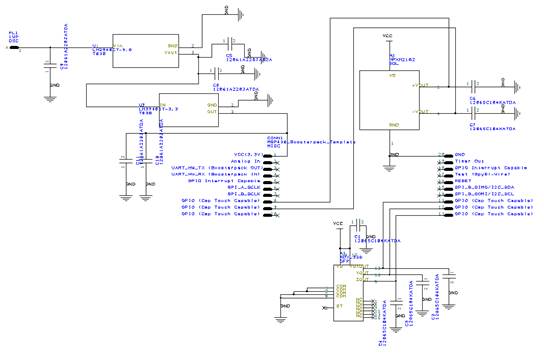
Figure 14 Circuit schematic
The next step in the process was
to lay the circuit for a two-layer PCB.
With the template for the pin out of the MSP430 designed by Mike Mock,
the components were placed into the PCB layout area and arranged to have the
sensors’ outputs go to different GPIOs of the MSP430 so that they may be read
and converted in the ADC10. The final PCB design is shown below.
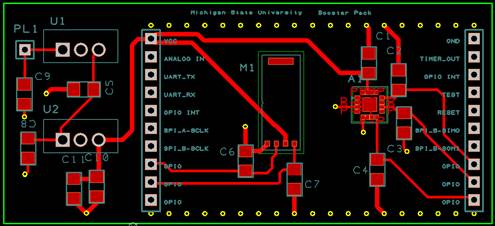
Figure 15 Final PCB layout for
booster pack
Booster Pack
The PCB was fabricated by
Advanced Circuits and shipped to MSU so the sensors and minor components could
be soldered to the board. The blank PCB is shown below.
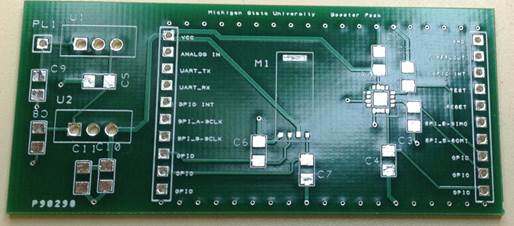
Figure 16 PCB without components
After checking that the pins of
the booster pack lined up with the MSP430, the power supply and regulatory
components were added first. The booster pack uses a LDO that brings a 9V to
3.3V and can be seen on the far left side of the PCB. After the power supply
was tested and confirmed to work properly the components were added to the
board. The PCB with all components except the ADXL330 was added to the PCB and is
shown below. The omission of the ADXL330 at this step will be discussed later.
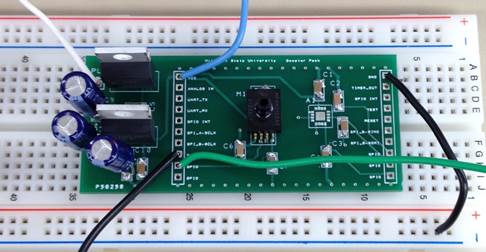
Figure 17 PCB with components
added
The next step was to fully remove
the PCB from the bread board and mount to the MSP430. This would ensure that
the pin out was spaced correctly and that the LDO would properly supply both
the MSP430 and the booster pack. The booster pack was mounted on the MSP430 and
is shown below.
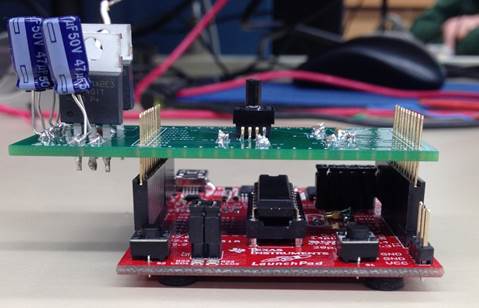
Figure 18 Booster Pack mounted to
MSP430
Integration of Booster Pack into rocket
After all the components were
soldered and tested, the booster pack was mounted to the MSP430 and placed into
the electronics bay of the rocket. The picture below shows the booster pack
mounted to the MSP430 and secured to the electronics bay.
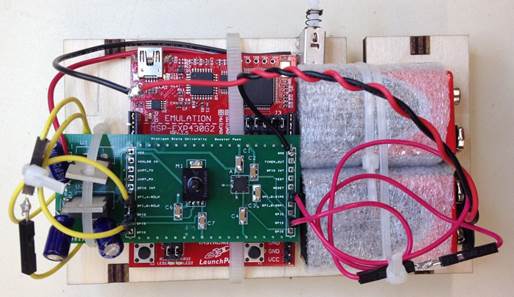
Figure 19 Final set up for
electronics bay
The electronics bay was placed
inside the rocket with leads running to the top and bottom of the electronics
bay enclosure that would send current to the charges to deploy parachute. The
booster pack, electronics bay, electronics bay enclosure, and rocket are shown
below.
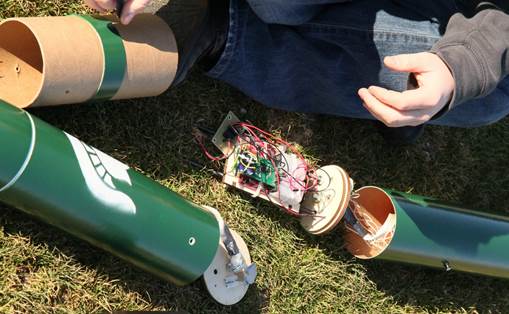
Figure 20 Booster Pack,
electronics bay, enclosure and rocket
Software and Coding
The problem statement required
the final solution to implement interfaces between the ADX1330 accelerometer,
the MPXM2102 altimeter, and the MSP430 microcontroller. Analog voltages will be
sent to various input pins on the MSP430, and the microcontroller must convert
the signals to digital values, and then store them locally in memory. Once
stored, these values are compared to pre-set values, which once reached will
trigger certain events:
- Enter main block of code once
accelerometer reads ascent (reading greater than 2.44 volts from
accelerometer)
- Trigger ejection of drogue parachute
(check if reading has reached .5g to -.5g [1.737V - 1.61V] threshold)
- Trigger ejection of main parachute
(altimeter reads 600 feet)
(For the two parachutes, a
fail-safe timer has been programmed to prevent rocket damage)
This is best accomplished
utilizing the analog-to-digital conversion unit (ADC) localized on the MSP430.
The first step in the process is to set up the ADC10 control registers. There
are two of these registers that must be initialized with specific values. For
our project, the first register is used to activate and set the on-board
reference voltage, enable ADC10 interrupts, enable multiple sample and
conversion, and turn on the ADC10 unit. The second register is used to enable
the correct analog input pins and set conversion sequence mode
(repeat-single-channel for our purposes). This mode was selected as the
voltages need to constantly sample in real-time to ensure accuracy. Once the
registers are set up correctly (full register set up included in appendix), the
first while loop is entered and conversion is enabled and commenced. This first
loop simply checks the voltages coming from the accelerometer, and breaks from
the loop when it sees more than 2.44 volts, which indicates ascent of the
rocket. This is necessary as the drogue parachute would most likely eject
during handling otherwise. After the initial loop, the MSP430 starts to look
for the apogee, which we gave a threshold of 1.737 volts and 1.61 volts. It
then triggers an output pin, which sends a current that eventually ignites the
ejection charge (operation will be covered in depth in the next chapter), and
then breaks from that loop. The third and final loop looks for a target
altitude, which we have set to 600 feet to allow for safe falling distance.
Once the rocket has descended to the desired height, another output current is
sent which ignites the main parachute’s ejection charge, bringing the rocket
back to ground.
Problems Encountered
There were many problems that
were encountered during the design. One of the first problems was with the
accelerometer. Though the component met the design criteria, the ADXl330 was
extremely small and had leads which were under the component. This made it
impossible to solder on by hand with a traditional soldering iron. The design
team was unsure how to address this problem with the resources that were made available
to them. This issue was solved when a fellow ECE 480 student ran into the same
problem and purchased a hand-held reflow soldering gun. The next problem was
found in the sensitivity of the altimeter. The altimeter’s sensitivity was too
small and voltage output was differential. This led to issues in converting the
voltage output (found to be in millivolts) such that the ADC would only notices
1 or 2 bits of change in the voltage due to altitude. This problem was
addressed in the coding to ensure if the change in altitude was not detected
that a failsafe timer would trigger the remaining parachute. Another issue was
with the voltage regulator. The design team was forced to use lead wire
capacitors because the surface mount were not polarized. This lead to height
issues in the electronics bay. This problem was addressed by reorienting the
MSP430 and booster pack and slightly turning the capacitors to make room. The
last issue the team faced was the lack of current the MSP430 microcontroller
could output. The current from the microcontroller was too small to ignite the
electronic matches that would ignite the black powder charges. This issue was
resolved by using relay switches connected to another 9V. This would allow the
charges to draw current from the 9V battery rather than the microcontroller.
Chapter 4:
Simulation and Testing
Testing ADXL 330
The accelerometer was tested in
lab to insure that the device would output proper 3 axis voltages. Each axis
has a 0g bias voltage that depends on the orientation of the devices in
relationship to the direction of gravity. The figure below, courtesy of Analog
devices data sheet, is shown below. The orientation used for the design is
circled in the figure.

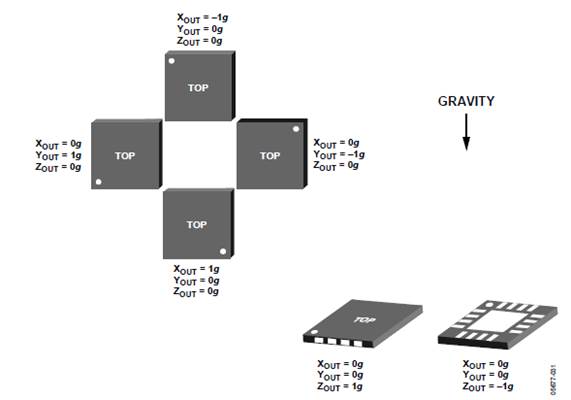
Figure 21 Voltage output of 3
axis sensor in different orientations
When the battery was attached to
the circuit the Y-axis voltage was tested. The expected voltages and
sensitivity are shown below, courtesy of Analog Devices. The data sheet gives
voltages and sensitivity with a 3V power supply, so voltages are corrected to
3.3V supply used in the design.
|
|
|


Figure 22 0G output and
sensitivity of Y axis on 3V supply
When the Y axis pin was tested on
the multi meter, it read 1.68V with a 0g orientation. From the above figure,
the 0g voltage is 1.53V on a 3 V supply. Multiplying this by (3.3V/3V) corrects
to the proper power supply, and yields 1.68V. The Y axis was now tested in the
upright position, which corresponds to the Y axis reading -1g. Using the
sensitivity of .3V/g * (3.3V/3V) yields .33V/g sensitivity. From the corrected
0g voltage and sensitivity, the -1g upright position voltage was found. The
expected voltage was 1.68V – 1g(.33V/g) = 1.35 V. Our voltage was found to be
1.37V. These tested prove that the Y axis was giving acceptable output voltages
with respect to supply voltage and orientation.
Testing the MPXM2102
The MPXM altimeter outputs a
differential voltage that is directly proportional to the atmospheric pressure.
The data sheet for the MPXM2102 notes a full scale voltage and sensitivity or
40mV and .4mV/Kpa respectfully. The sensor also has a 0V offset. These values
were corrected to 3.3V power supply by multiplying by (3.3V/10V) which yields
13.2 mV full scale span and .132 mV/Kpa. The sensor is capable of operating
from 100Kpa (normal ground atmospheric pressure) to 0Kpa (vacuum). The
altimeter was tested at room temperature by the equation:
 =
=  (V) +
Pressure(kPa)*Sensitivity(mV)
(V) +
Pressure(kPa)*Sensitivity(mV)
The output voltage matched our
expected outcome of .132mV/Kpa * (100Kpa) = 13.2mV. The voltage output with
respect to the pressure is shown in the figure below, courtesy of Freescale.
This figure shows the output in terms of the 10V supply.
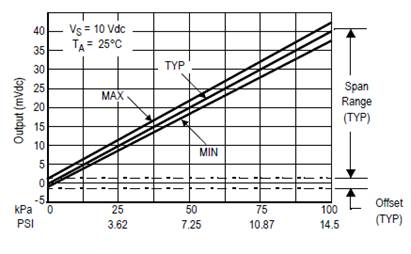
Figure 23 Output voltage vs.
Pressure of MPXM2102
Full Circuit Bench Testing
Given the parameters established
above, a proper threshold voltage could be implemented for the accelerometer,
and a correct voltage differential can be established (using the equation).
These are the two critical pieces of data necessary for correct implementation
of our project. Fortunately, simulating specific voltage levels is a relatively
easy thing to do in lab, using standard DC power supplies (for initial
testing). Testing was made easy further so by using essentially the same coding
algorithm to achieve all three trigger events, with only minor alterations for
the last event.
To test the algorithm with the
full circuit, the MSP430 was connected to a computer for power supply using a
mini-USB. Once the code was loaded onto the MSP430, the algorithm described in
Chapter 3 was run, and the analog voltage signals were sampled and converted to
a digital value, and then compared to the 1.737V - 1.61V threshold. For the
sake of simplicity, the MSP430 was programmed to turn on the green LED located
on the LaunchPad when the sampled voltage was within that threshold.
(accelerometer implementation is included in appendix) Once it was determined
the algorithm could correctly sample and compare an analog input, it was
altered to fit the needs of the altimeter. For this, a differential must be
considered, resulting in a basic mathematical operation between two analog
inputs (V+ out and V- out). Like for the accelerometer, analog voltages are
sampled continuously (two for the altimeter); however, the difference is these
two values must be subtracted before they can be compared to the pre-set value
for 600 feet. Bench testing for the altimeter has obvious limitations as not
much height difference can be achieved solely in lab. Thus, we relied heavily
on the equation and DC power supply to simulate the estimated target voltage.
Chapter 5:
Conclusion
Final Cost
From the perspective of the
design team, we spent a total of $443.51 out of our $500 budget. The majority
of this amount (approximately 56%) came from purchases involving the rocket kit
we constructed, as well as the other rocketry components that were needed for
launch (electronic launch controller, rocket motors, etc.). Another portion of
the team’s budget was spent primarily on testing out design possibilities, or
ensuring that extra components were available should something have went wrong
during prototyping.
After finalizing our design and
taking stock of what was ultimately used in the final design, it becomes easier
to take the stance of selling our project to potential rocket enthusiast
customers. Costs associated with rocket components will be neglected here
(hobbyists construct rockets of varying sizes and launch specifications).
Recall the prompt of this project was not to design a rocket, but to design
electronics which would aid in parachute deployment. Taking this in to account,
we have achieved a design which will yield a per unit cost of $58.66 (See
Figure24) This price is very competitive with similar commercially available
devices.
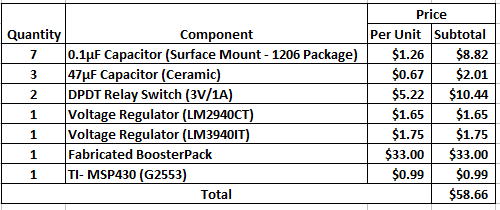
Figure 24 Final Design’s Itemized
Per Unit Cost
(Note: 9V Batteries not included)
Schedule
The figure below displays the
team’s overall schedule. See Appendix III for a more detailed breakdown of each
phase, as well as the Gantt chart.
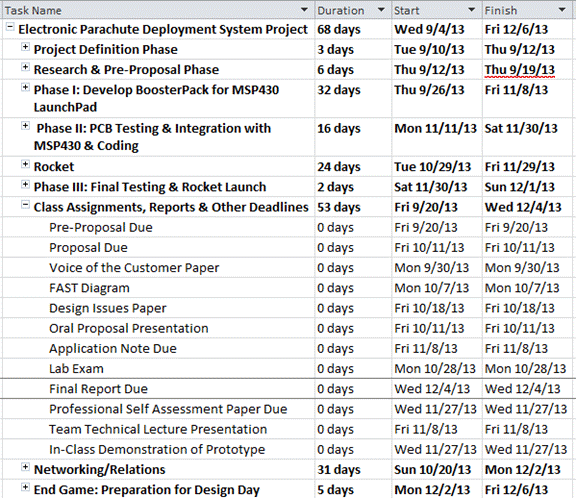
Figure 25 Project Timeline
Summary
As a group, our mission was to
utilize electronics to create the "Better Mouse Trap" of model
rocketry. We used two sensors, an accelerometer to detect free-fall, and a
barometric altimeter to detect altitude via atmospheric pressure. These sensors
detected their prescribed measurements and converted their results into
voltages which deployed two different parachutes electronically. This was
tested in the laboratory via digital multimeter, as well as via vacuum chambers
for the air pressure.
We successfully completed a
prototype design which responds to changing acceleration (and altitude when
placed inside a vacuum chamber) and toggles a switch to ignite an electronic
match…this simulates the charge which would deploy each parachute. During our
preliminary launch, we as a group came to appreciate the frustrations of those
we sought out to help in the first place. During takeoff, the unpredictability
of black powder became clear when spontaneously, our rocket caught on fire
before even lifting off. What at first seemed to be failure, in actuality only
serves to strengthen our original purpose. Conventional model rockets utilize
black powder charges, not only for takeoff, but also to deploy the parachutes.
The unpredictability of black powder and associated consequences reveals the
need for scaling back its use as much as possible. In the past, fuses were lit
for takeoff and were very unsafe, as once it was lit there would be little way
to stop it. Today, electronic launch pads are used with the added security of
safety-interlock switches. The mainstay of our project was the construction of
an electronics bay which would deploy the parachutes without black powder. It
works and given more time and resources for another launch could be proven. Our
project represents the future of model rocketry - a transition from the
convention to higher technologies and ingenuity which increases not only
accuracy, but also safety. Therefore, it has been a success.
Conclusion:
The design
team was able to successfully develop for Texas Instruments a PCB board which
uses an accelerometer and altimeter sensor to deploy two charges which
correspond to parachute dual deployment. The functionality is easily
demonstrated, and has been praised by veteran model rocket enthusiasts. In addition,
all of this has been done at a very reasonable price of about $59 for hobbyist
use.
Suggested Future Developments:
Should future work be done on this project, our
group has several suggestions and disclaimers:
- The selected altimeter would work best with rocket motors of higher
classes. More specifically, those above G-class… This is because at the
1,000ft. altitude we designed our rocket for, the atmospheric pressure
does not vary much from the ground. The altimeter is able to better sense
variation in atmospheric pressure, and prove more accurate the higher your
rocket goes.
- Higher altitudes yield the drawback of lack of certification for a
novice hobbyist, and would most likely require a launch site sponsored by
a model rocket enthusiast organization.
- DO plan for mechanical failure, as we experienced with the black
powder motor. Have several rocket bodies on hand, that way, if one is
destroyed you may be able to transplant the circuitry within another and
be ready for the next launch very quickly.
Appendix I :
Technical Contributions
Team Members:
Tayloire
Thomas:
 As the
project manager, Tayloire Thomas sought out to be active on many planes of this
design project. During the research phase, Tayloire assisted in the initial
design of the low-pass filter designed in TINA-TI and PCB Artist to get the
group familiar with printed circuit board (PCB) design and fabrication. After
the final PCB was populated, Tayloire collaborated with Ryan Lupinski on the
initial testing of the components, and made the suggestion to add coupling
capacitors – a solution which solved the problem of current flowing back into
the PCB’s voltage regulators. Tayloire also worked closely with Ian McCall on
laying out the framework of the project’s coding for the accelerometer and
altimeter sensors. Not particularly adept at coding, Tayloire found it very
helpful to draw flowcharts and other diagrams to display what needed to be
accomplished in the coding. An example of which being the team’s FAST diagram,
and several Proof of Concept slides presented to the team’s sponsor during
several meetings. In doing so, Tayloire experienced much growth in the coding
sub-set of the electrical engineering education and the necessary confidence to
do more in the future. Within the rocket aspect of the project, Tayloire
collaborated often with Kyle Christian and Moses Jones. These collaborations
gave birth to the relay-switch solution to the setback from the microcontroller
not outputting enough current. This solution helped to meet the most
significant deliverable of the project - being able to ignite a small powder
charge or electronic match with coding. All in all, Tayloire learned a great
deal from this design project, including: circuit design, PCB layout, coding
concepts, and the importance of simulation prior to implementation. The
greatest takeaway will be flexibility – throughout the entire project Tayloire
and the team learned how to surmount unforeseen obstacles, and how to prevent
future ones. A great satisfaction for Tayloire was working together with the
other members of this project and witnessing the transition from a group of
individuals into a team, in sync with each other and each other’s subtasks.
As the
project manager, Tayloire Thomas sought out to be active on many planes of this
design project. During the research phase, Tayloire assisted in the initial
design of the low-pass filter designed in TINA-TI and PCB Artist to get the
group familiar with printed circuit board (PCB) design and fabrication. After
the final PCB was populated, Tayloire collaborated with Ryan Lupinski on the
initial testing of the components, and made the suggestion to add coupling
capacitors – a solution which solved the problem of current flowing back into
the PCB’s voltage regulators. Tayloire also worked closely with Ian McCall on
laying out the framework of the project’s coding for the accelerometer and
altimeter sensors. Not particularly adept at coding, Tayloire found it very
helpful to draw flowcharts and other diagrams to display what needed to be
accomplished in the coding. An example of which being the team’s FAST diagram,
and several Proof of Concept slides presented to the team’s sponsor during
several meetings. In doing so, Tayloire experienced much growth in the coding
sub-set of the electrical engineering education and the necessary confidence to
do more in the future. Within the rocket aspect of the project, Tayloire
collaborated often with Kyle Christian and Moses Jones. These collaborations
gave birth to the relay-switch solution to the setback from the microcontroller
not outputting enough current. This solution helped to meet the most
significant deliverable of the project - being able to ignite a small powder
charge or electronic match with coding. All in all, Tayloire learned a great
deal from this design project, including: circuit design, PCB layout, coding
concepts, and the importance of simulation prior to implementation. The
greatest takeaway will be flexibility – throughout the entire project Tayloire
and the team learned how to surmount unforeseen obstacles, and how to prevent
future ones. A great satisfaction for Tayloire was working together with the
other members of this project and witnessing the transition from a group of
individuals into a team, in sync with each other and each other’s subtasks.
Ryan
Lupinski:
 Ryan
Lupinski was the lab coordinator and technical lead for the design project.
Ryan selected the sensors for the project and was the lead designer for the PCB
using PCB Artist, wrote code in Texas Instruments Code Composer Studio for the
microcontroller, and lead initial and final testing of the circuit and its
components. Ryan created the schematic and PCB symbols and footprints for the
circuit design. Following the instructions of Pete Semig and assistance from
TI’s Mike Mock, the schematic for the final circuit including the power
regulator, accelerometer, and altimeter were designed. Once the schematic was
approved, Ryan finalized the PCB layout and sent the PCB for fabrication. Ryan
was in charge of populating the PCB with components and doing initial testing
of the power regulator and then testing the sensors. Once the power regulator
was confirmed to safely take a 9V battery to 3.3V for the microcontroller and
sensors, Ryan tested the circuit and confirmed expected voltage output from the
sensors. He then collaborated with Ian McCall to work on coding for the
microcontroller. This coding included creating specific loops to ensure only 1
sensor at a time was read by the ADC of the MSP430 microcontroller, helped troubleshoot
the differential output issue of the altimeter, and added failsafe coding to
ensure safety of the rocket. This failsafe coding included specific loops that
ensured the rocket was in flight by checking the accelerometer, then jumping
into loops that first checked for 0g
(peak of flight), then checking the altimeter to find the height for the second
chute deployment. Along with these specific check loops, Ryan coded a timer
that would increment by 1 for each check of a sensor and if the timer counted
up to a specified count it would toggle a pin to the correct ejection charge.
This failsafe was intended to ensure a safe deployment of parachutes if the 0g
event or 2nd parachute altitude was not found. Ryan’s aptitude with
circuit design proved essential in helping to overcome each of the obstacles
faced by the group.
Ryan
Lupinski was the lab coordinator and technical lead for the design project.
Ryan selected the sensors for the project and was the lead designer for the PCB
using PCB Artist, wrote code in Texas Instruments Code Composer Studio for the
microcontroller, and lead initial and final testing of the circuit and its
components. Ryan created the schematic and PCB symbols and footprints for the
circuit design. Following the instructions of Pete Semig and assistance from
TI’s Mike Mock, the schematic for the final circuit including the power
regulator, accelerometer, and altimeter were designed. Once the schematic was
approved, Ryan finalized the PCB layout and sent the PCB for fabrication. Ryan
was in charge of populating the PCB with components and doing initial testing
of the power regulator and then testing the sensors. Once the power regulator
was confirmed to safely take a 9V battery to 3.3V for the microcontroller and
sensors, Ryan tested the circuit and confirmed expected voltage output from the
sensors. He then collaborated with Ian McCall to work on coding for the
microcontroller. This coding included creating specific loops to ensure only 1
sensor at a time was read by the ADC of the MSP430 microcontroller, helped troubleshoot
the differential output issue of the altimeter, and added failsafe coding to
ensure safety of the rocket. This failsafe coding included specific loops that
ensured the rocket was in flight by checking the accelerometer, then jumping
into loops that first checked for 0g
(peak of flight), then checking the altimeter to find the height for the second
chute deployment. Along with these specific check loops, Ryan coded a timer
that would increment by 1 for each check of a sensor and if the timer counted
up to a specified count it would toggle a pin to the correct ejection charge.
This failsafe was intended to ensure a safe deployment of parachutes if the 0g
event or 2nd parachute altitude was not found. Ryan’s aptitude with
circuit design proved essential in helping to overcome each of the obstacles
faced by the group.
Ian McCall:

Ian McCall served on the team as
Webmaster, as well as Lead Programmer of the project’s coding experience. Ian’s
technical role of the project focused entirely on coding the MSP430
microcontroller to properly interface with the accelerometer and altimeter. In
collaboration with Tayloire Thomas, Ian had a large hand in the designing
coding outlines. Later, Ian (along with Ryan Lupinski) led the implementation
of this overall outline which was later used to accomplish the final solutions
that would be the basis of the team’s prototype demonstration. Ian researched
potential algorithms that could be used to achieve the desired implementation,
including conversion and storage of analog voltage values. Using said research
and prior knowledge, he was able to correctly interface the external components
with the MSP430 microcontroller using the analog-to-digital conversion unit,
sampling incoming analog voltages and storing them in memory as digital values.
The code would then compare these values to desired pre-set values, triggering
proper parachute ejections. He, with help from Ryan, was also responsible for
bench testing of the integrated Boosterpack and MSP430 microcontroller. This
testing helped determined the correct voltage threshold for the MSP430 to
compare to for drogue parachute ignition.
Moses Jones:
 Throughout
the design process, Moses made different contributions for the success of the
design team. Moses was assigned the role of document prep during the design
process, but he also fulfilled technical roles. Moses assisted the team with
leading the mechanical construction of the team’s model rocket, researching
model rocket electrical operations of launch control systems, along with
simulating voltage outputs and pressure from the altimeter sensor. During the
rocket building process, Moses collaborated with Kyle Christian due to the
difficulty of rocket building. Moses has exceptional organization skills so he
developed a plan to efficiently build the team’s model rocket within five
days. The team would now have enough
time to properly input the circuit design into the rocket. The rocket building
process was divided into three stages, rocket assembly rocket priming, and
rocket painting. Moses was in charge all of selecting the appropriate
components used during the rocket building process. Moses also worked together
with Ryan Lupinski to create altimeter circuit simulations using Texas
Instruments TINA circuit simulation program. This will allow the team to better
understand the role of the altimeter during the rocket launch. The team will
now have an accurate method to estimate voltage output values during and after
the rocket launch. Moses also discovered methods the team could use to convert
voltage to current in order to ignite the rocket, so the parachutes could
properly during the rocket launch. Moses
was involved in the decision to add electrical components that would allow the
MSP 430 microcontroller to output enough current to ignite a charge to deploy
both parachutes. After this process was completed, the team was ready to launch
the rocket without any issues. Lastly, Moses was responsible for composing
technical progress reports, so the team’s sponsor, Pete Semig, and facilitator
could track the progress on the team’s design process.
Throughout
the design process, Moses made different contributions for the success of the
design team. Moses was assigned the role of document prep during the design
process, but he also fulfilled technical roles. Moses assisted the team with
leading the mechanical construction of the team’s model rocket, researching
model rocket electrical operations of launch control systems, along with
simulating voltage outputs and pressure from the altimeter sensor. During the
rocket building process, Moses collaborated with Kyle Christian due to the
difficulty of rocket building. Moses has exceptional organization skills so he
developed a plan to efficiently build the team’s model rocket within five
days. The team would now have enough
time to properly input the circuit design into the rocket. The rocket building
process was divided into three stages, rocket assembly rocket priming, and
rocket painting. Moses was in charge all of selecting the appropriate
components used during the rocket building process. Moses also worked together
with Ryan Lupinski to create altimeter circuit simulations using Texas
Instruments TINA circuit simulation program. This will allow the team to better
understand the role of the altimeter during the rocket launch. The team will
now have an accurate method to estimate voltage output values during and after
the rocket launch. Moses also discovered methods the team could use to convert
voltage to current in order to ignite the rocket, so the parachutes could
properly during the rocket launch. Moses
was involved in the decision to add electrical components that would allow the
MSP 430 microcontroller to output enough current to ignite a charge to deploy
both parachutes. After this process was completed, the team was ready to launch
the rocket without any issues. Lastly, Moses was responsible for composing
technical progress reports, so the team’s sponsor, Pete Semig, and facilitator
could track the progress on the team’s design process.
Kyle Christian:
 Kyle
Christian made technical contributions in several aspects of the project. These
included simulations of the team’s desired outcomes, PCB design, and leading in
aspects pertaining to the rocket. Using TINA-TI, Kyle worked with the other
team members, and reviewed datasheets to determine exactly how acceleration and
atmospheric pressure would be converted to respective voltages for use in
coding. Under the guidance of project sponsors Pete Semig and Mike Mock, Kyle
was able to interpret what these simulations would translate to under
real-world scenarios. The dividing line between theory and actuality became
very clear in this task. Kyle collaborated with Tayloire Thomas to troubleshoot
a problem involving not enough current being output from the MSP430. This
problem was remedied through the addition of two voltage relay switches. Kyle
led the design of an additional PCB with these relay switches mounted to ensure
the team’s ability to use code to ignite electronic matches under the
deployment conditions of the accelerometer and altimeter sensors. Kyle’s
greatest niche within the group fell as the resident rocket expert. At the
onset of the project, Kyle was the only member of the team with previous
experience in model rocketry. (As a kid, he launched small scale model
rockets.) Kyle collaborated with Moses Jones in the selection and construction of
the rocket kit. Upon the team’s completion of a final prototype, the team
members looked to Kyle for integration within the electronics bay of the
rocket. Besides installing the electronics, an integral component of rocket
launch involved black powder charges. Kyle was primarily responsible for
ensuring that this potentially hazardous material was properly handled while
being implemented with the electronics to demonstrate a functioning prototype.
During launch day, Kyle led the entire launch setup. In summation, Kyle
Christian contributed technical aptitude with prior knowledge in model
rocketry, and confidence to ensure the success of this project.
Kyle
Christian made technical contributions in several aspects of the project. These
included simulations of the team’s desired outcomes, PCB design, and leading in
aspects pertaining to the rocket. Using TINA-TI, Kyle worked with the other
team members, and reviewed datasheets to determine exactly how acceleration and
atmospheric pressure would be converted to respective voltages for use in
coding. Under the guidance of project sponsors Pete Semig and Mike Mock, Kyle
was able to interpret what these simulations would translate to under
real-world scenarios. The dividing line between theory and actuality became
very clear in this task. Kyle collaborated with Tayloire Thomas to troubleshoot
a problem involving not enough current being output from the MSP430. This
problem was remedied through the addition of two voltage relay switches. Kyle
led the design of an additional PCB with these relay switches mounted to ensure
the team’s ability to use code to ignite electronic matches under the
deployment conditions of the accelerometer and altimeter sensors. Kyle’s
greatest niche within the group fell as the resident rocket expert. At the
onset of the project, Kyle was the only member of the team with previous
experience in model rocketry. (As a kid, he launched small scale model
rockets.) Kyle collaborated with Moses Jones in the selection and construction of
the rocket kit. Upon the team’s completion of a final prototype, the team
members looked to Kyle for integration within the electronics bay of the
rocket. Besides installing the electronics, an integral component of rocket
launch involved black powder charges. Kyle was primarily responsible for
ensuring that this potentially hazardous material was properly handled while
being implemented with the electronics to demonstrate a functioning prototype.
During launch day, Kyle led the entire launch setup. In summation, Kyle
Christian contributed technical aptitude with prior knowledge in model
rocketry, and confidence to ensure the success of this project.
Appendix II:
References
Datasheets
ADXL330 iMEMS® Accelerometer https://www.sparkfun.com/datasheets/Components/ADXL330_0.pdf
LM2940CT LDO Voltage Regulator
http://www.mouser.com/ProductDetail/Texas-Instruments/LM2940CT-50-NOPB/?qs=X1J7HmVL2ZHd4yipOGCVKg
LM3940IT LDO Voltage Regulator
http://www.mouser.com/ProductDetail/Texas-Instruments/LM3940IT-33-NOPB/?qs=QbsRYf82W3FGrjqcSAbcdA
MPL3115A2 Precision Altimeter http://www.freescale.com/files/sensors/doc/data_sheet/MPL3115A2.pdf
MPXM2102 Pressure Sensor
http://totem-dcs.web.cern.ch/totem-dcs/index.php?dir=E.03.05.05&file=02.MPXM2102.pdf
MSP430F4270 Altimeter Demo - http://www.ti.com/lit/ds/symlink/tps5410.pdf
MSP430G2x53 Datasheet - http://www.ti.com/lit/ds/slas735j/slas735j.pdf
Manuals
EZ675-5KM
Model Rocket Altimeter User’s Manual – http://here-and-beyond.com/Log.In/Altimeters/EZ675OperationManual081508.pdf
“PCB Artist Quickstart Guide” – Peter Semig
(TI)
PCB Artist Software - http://www.4pcb.com/free-pcb-layout-software/index.html
PCB Artist Tutorial - http://www.4pcb.com/media/PCBArtistTutorial.pdf
TINA-TI Software - http://www.ti.com/tool/tina-ti
Web Sources
"All
About Rocket Engines." All About Rocket
Engines. 11 Oct. 2013
http://www.lunar.org/docs/handbook/motors.shtml
"Altitude Prediction
Charts." Estes Rockets. N.p., n.d. Web. http://sargrocket.org/Documents/Estes/TR-10.pdf
"Electronics Mounting
Kit." Apogee Components. N.p., n.d. Web. 24 Oct. 2013. http://www.apogeerockets.com/Electronics_Payloads/Electronics_Accessories/Electronics_Mounting_Kit
"First Fire Igniter for High
Power Motors." Apogee Components. N.p., n.d. Web. 21 Nov. 2013.http://www.apogeerockets.com/Rocket_Motors/AeroTech_Accessories/First_Fire_Igniter?cPath=7_160
Lewis, Christopher P., and
Michael Kraft. "Simulation of a Micromachined Digital Accelerometer in
SIMULINK and PSPICE." Coventry University School of Engineering, n.d. Web.
Nov. 2013. http://users.ecs.soton.ac.uk/mk1/exe_pap4.pdf
"MagFire (MF) Ematch Kits:
Make Your Own Low Current Electric Matches." Rocketflite. N.p.,
n.d. Web. 22 Nov. 2013. http://www.rocketflite.com/products_mf.htm
"Model Rocket Flight
Computer." Model Rocket Flight Computer. N.p., n.d. Web. 04 Nov.
2013. http://www.expresspcb.com/feedback/flightcomp/flightcomp.htm
"Physics."
Model Rocketry. 11 Oct. 2013
http://nmsciencefoundation.org/rocketry_principles.htm
"The Rocketman Online Store, Rocket Chutes & Drogue
Chutes." The Rocketman
Online Store,Rocket Chutes &
Drogue Chutes. 11 Oct.
2013 http://www.therocketman.com/chutes.html
"State Regulations."
State Regulations. 11 Oct. 2013
http://www.estesrockets.com/state_regulations
"Torrent
Madcow Rocket." Apogee Components. N.p., n.d. Web. 21 Oct. 2013.
http://www.apogeerockets.com/Rocket_Kits/Skill_Level_3_Kits/Torrent_Rocket_Kit?cPath=1_232
"Upper Air Data
Details." Unisys Weather. N.p., n.d. Web. 11 Oct. 2013. http://weather.unisys.com/upper_air/details.php
"Welcome
to Rocketry." Welcome to Rocketry. 11 Oct. 2013
http://www.jcrocket.com/welcome.shtml
Appendix III:
Technical Attachments
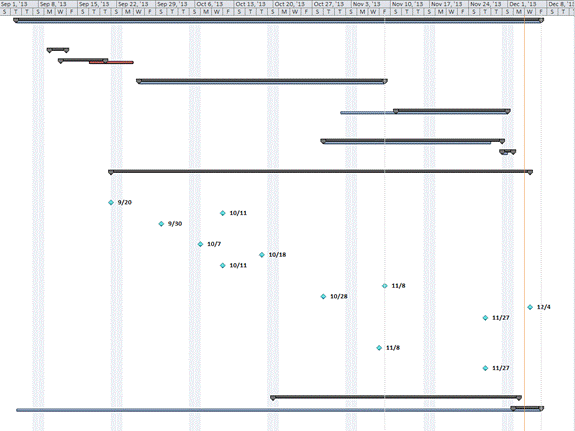
Figure 26 Project Gantt Chart
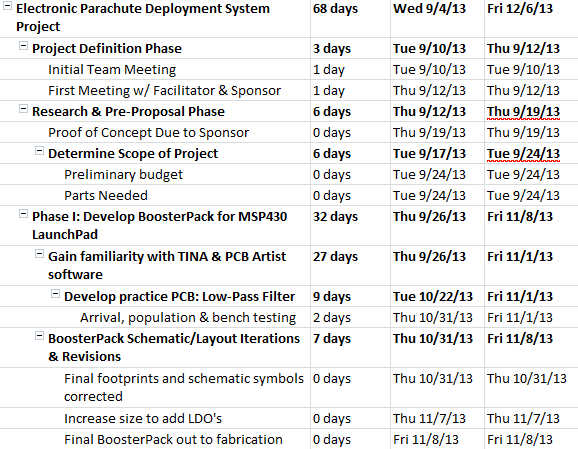
Figure 27 Timeline: Phase I
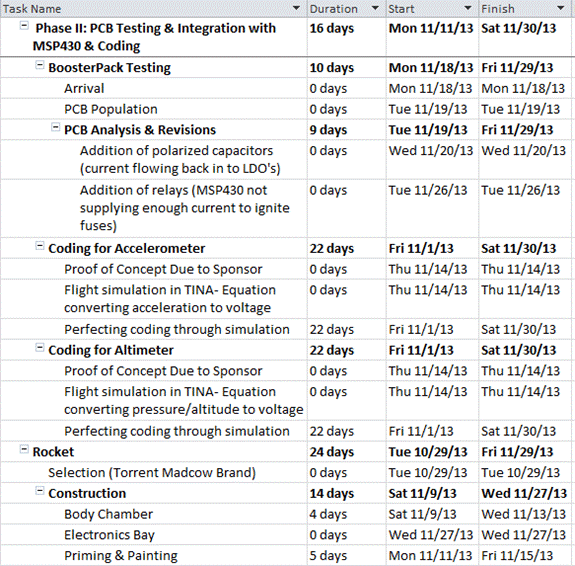
Figure 28 Timeline: Phase II
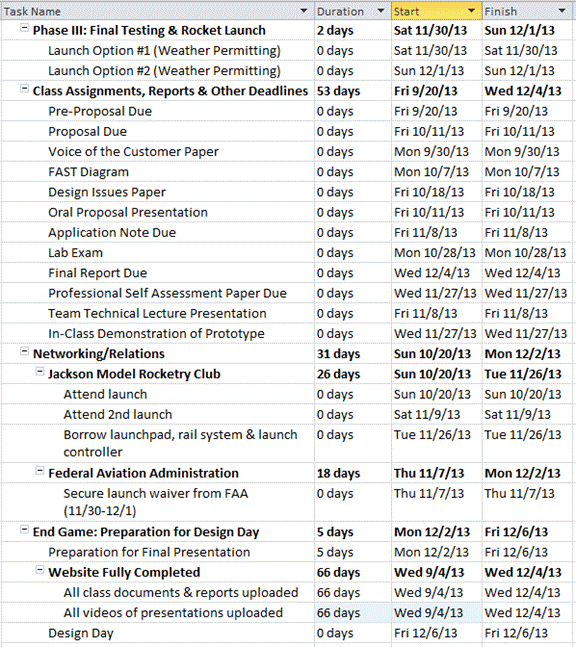
Figure 29 Timeline: Phase III
& End Game
PSpice Sensor Simulations
Accelerometer:
Vout = a(m/s^2)*(.333V/m/s^2) – 1.65V
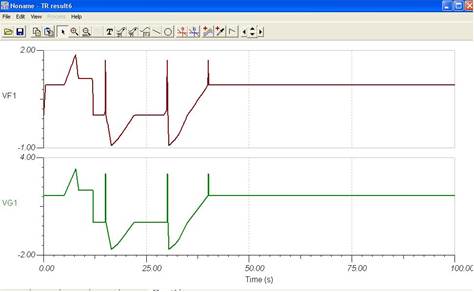
Figure 30 Accelerometer
Altimeter:
Vout =
Pressure(Kpa)*(.132mV/Kpa)
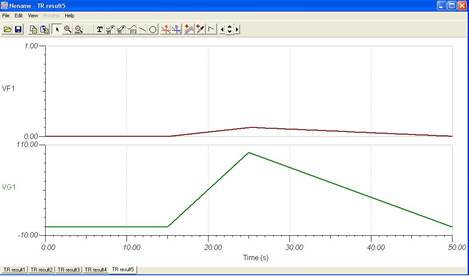
Figure 31 Altimeter
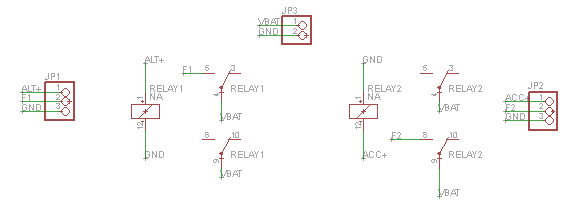
Figure 32 Relay Switch Schematic
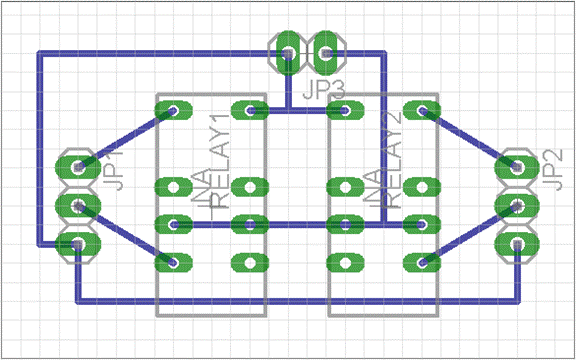
Figure 33 Relay Switch PCB Layout